

1. Set Google Alerts to get the scoop on new makeup collections
Lawd knows we love beauty, but keeping up with the latest makeup releases and beauty product rollouts can take forever!
Use Google Alerts to save time; find out what’s new from brands like MAC and Dior in a flash. All you need is an email address.
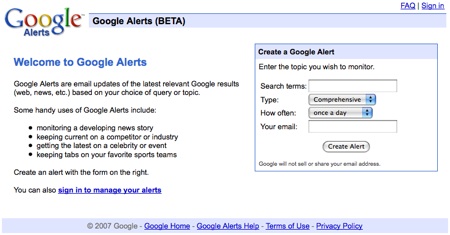
Just visit Google’s alerts page at www.google.com/alerts, input your search term (short and sweet works best, like [mac cosmetics] without the braces), your email address and how often you’d like to receive them and TADA! — beauty news delivered straight to your inbox.

CAUTION: It’s hella easy to create too many Google Alerts, LOL! At one point I was getting 27 Alerts emails per day, but at the bottom of every one is a link to quickly and easily cancel if they get to be a problem.
A few other ways to use Google Alerts…
- Find out who’s talking about you. Try an alert on your name.
- What are they saying about your website?
- Find bargains with alerts like [makeup sale].
2. Search inside specific websites
Sometimes I know the answer I’m looking for is posted somewhere on a particular website, but for the life of me I just can’t find it. Enter Google’s [site:] search operator.
If you include [site:] in your query, Google will restrict the results to that site only, like [mac site:www.makeupalley.com] will find pages about Mac within www.makeupalley.com, and [“mac cosmetics” site:www.makeupalley.com] will find pages where the term mac cosmetics (searches aren’t case sensitive) appears because the double quotes tell Google to search for an exact term, in this case “mac cosmetics”.

Note: There shouldn’t be a space between the [site:] and the website domain.
3. Conduct a Google blog search
Sometimes I like to restrict my Google searches to blogs, like if I’m looking for product previews or swatches before a major release.

4. Smooth operators
If you want to make the most of your Googling for beauty, try some of these advanced search operators… 🙂
link:
By using [link:], Google will list webpages that have links to a specific site. I use it when I’m just surfing, looking for new beauty blogs or finding out who has links to Makeup and Beauty Blog. For instance, [link:www.makeupalley.com] will list sites that have links pointing to Makeup Alley.
Note: Just like the [site:] search (and all of the other Google search operators), there shouldn’t be a space between the “link:” and the website’s name.
related:
The term [related:] will list web pages that are similar to another site. OOH! This one is soooo much fun. For example, [related:www.bellasugar.com] will list websites that are similar to BellaSugar.com.
site:
If you include [site:] in your query, Google will restrict the results to that site only, like [mac site:www.makeupalley.com] will find pages about Mac within www.makeupalley.com, and [“mac cosmetics” site:www.makeupalley.com] will find pages where the term mac cosmetics (searches aren’t case sensitive) appears.
5. Tell Google Maps to find stores in your area
Entering the name of a store followed by your ZIP code and clicking ‘Maps’ returns a list of stores in your area along with a map. From there, you can click a thumbtack and choose ‘Get Directions’ to plot directions to the store. It won’t replace GPS, LOL! But I’ve used it from time to time. 🙂

Your friendly neighborhood beauty addict,
Karen
Hi Karen, happy Saturday! So I am a Google junkie. You would think I work there (which I have tried on a couple occasions, but it’s too damn far from my house) because of how much I love them. I am super excited because the company I work for just switched to Google Apps for everything (mail, calendar, chat, video) so now I am an official “Google Guide” at work. It’s a sickness I tell you, but how on earth did we ever function without them?
Vampy Varnish´s last blog post..My Polish Collection to Date!
Hi Vampy Varnish,
Remember the time pre-Google? The first time I ever heard about them was at my BFF’s boyfriend’s house. He was a total computer nerd and I saw it on his computer. I remember asking him, “What the heck is Google?” LOLOL, soooo 1998.
That’s really cool that you’ll get to be a Google expert at work!
That is so clever! And I thought google was just a box on a white page. Shall I set up an alert with my name? eek! Thanks for all the tips!
Rowena´s last blog post..Valentine’s Gift Idea! Illamasqua
Thanks so much for all those tips! I didn’t even know we could do that with Google. Now I have more reasons to spend hours in front of the computer 😉
Karen-
I love how informative your blog has been these past few weeks. The vids especially are helpful. Thanks and keep up the great work. I’m gonna have to try these google tips myself. I never knew you could use google like this! Happy Saturday!!
I know isn’t it crazy? I remember WAY back my mother telling me that computers were going to be huge and I should really learn more about them and take classes. I was like “yeah right, that’s just a trend that will die out” LOL!
I am super excited, I just got back from shopping in the lovely downtown Walnut Creek Nordies area and picked up some yummy stuff at Sephora based on your swatches. I got the Laura Mercier Illuminating Tinted Moisturizer, Smashbox Hybrid Luminizing Primer, Urban Decay 24/7 in Ransom & Flipside and the MAC 129 brush. Yahoooo thanks!
Vampy Varnish´s last blog post..My Polish Collection to Date!
Google rocks! I use a lot of Google apps and makes my life so easy. Do you know that you can text Google and phone numbers for things you might be looking for. For example, I sent Google a text asking for Benefit Cosmetics Berkeley and it sent me the number & address. I was able to dial and not pay for 411. You can also get weather forecast, currency exchange, directions, answers to questions you may have, etc.
http://www.google.ca/mobile/sms/index.html
Marisol´s last blog post..Start your day the right way
Hi Rowena,
You’re welcome! 🙂
Hi Mel,
Oh yah! Google is full of fun stuff.
I really like the map option. It comes in really handy when you are planning a visit a new town and want to find restaurants or stores. 🙂
Hi Tania,
I’m really happy to hear that you’ve been finding the site useful! 🙂
I hope you’re having a nice weekend. What plans do you have for today?
Hi Vampy Varnish,
OH great haul! Laura Mercier makes lots of really great stuff… I wish that the line would get more love!
How are you liking your MAC brush?
Hi Marisol,
I knew about 411 but I didn’t know about the text option! How cool!
Hola Karen!
Makeup tips, Tutorials, FOTD’s and computer help…you are too much, lol. If I went a day without your daily feed I’d feel outta the loop, thanks for this info! Enjoy the rest of your weekend!
Great tips! Hooray for search engines! 🙂
google is the king!
Hi Mimi,
Glad to help! I hope you have a great week!
Hi Glosslizard,
Thanks!
Hi Charlene,
I heart google, too. 🙂